
Set up your Agent
Create an agent
Create a new agent in the Novu dashboard and connect your first provider.
Create an agent in the Novu dashboard before you scaffold a bridge app or write handler code. This page walks through creating the agent record and connecting your first provider.
Create an agent in the dashboard
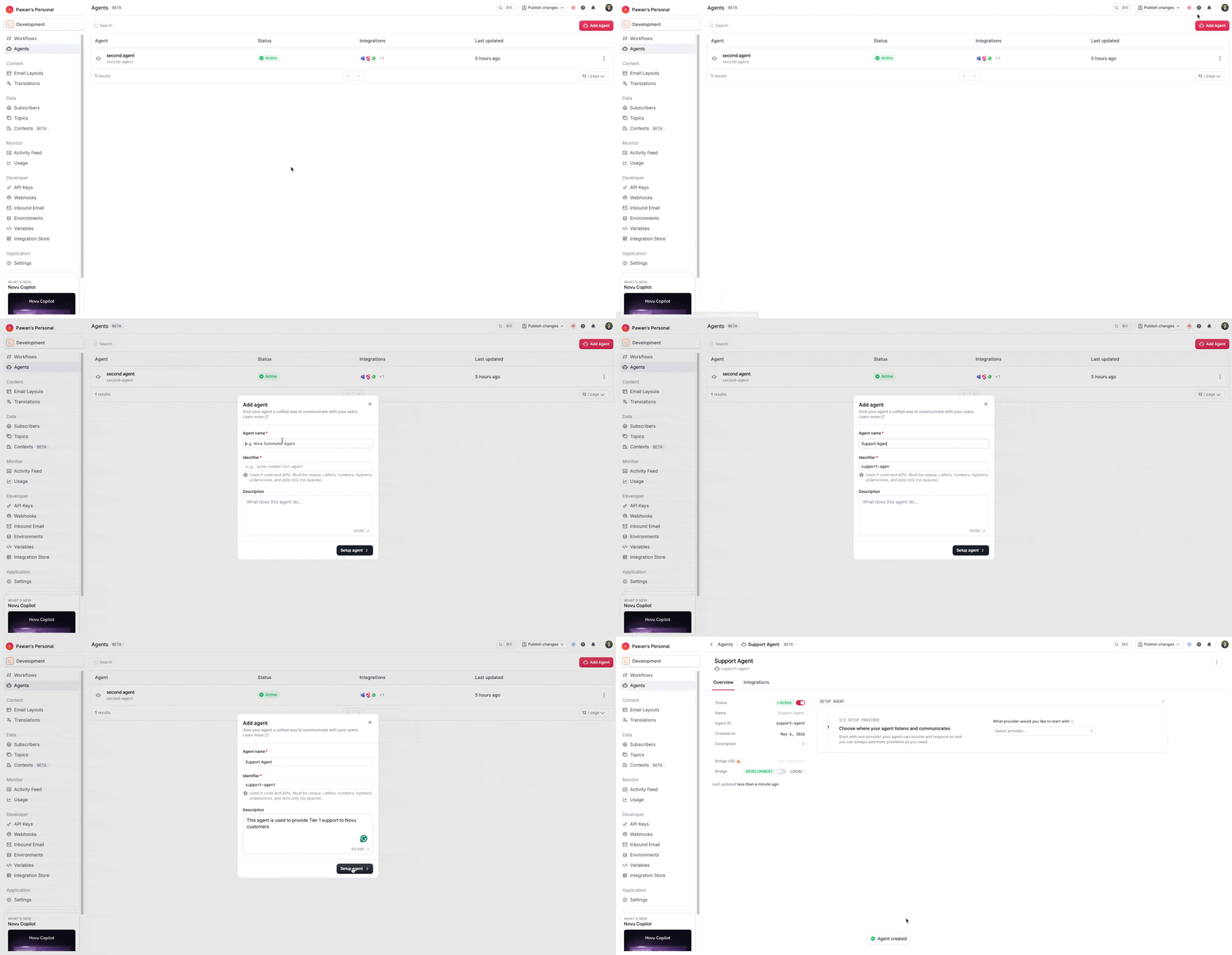
In the Novu dashboard, create a new agent and enter its basic details.
- In the Novu dashboard, go to the Agents page.
- In the sidebar, click Agents.
- Click Create agent.
- Enter the following information:
- Agent name: Display name for your agent. Slack and Microsoft Teams show this name when users mention the agent.
- Identifier: Unique slug used in code. Auto-generated from the name; cannot be changed after creation.
- Description: Summary of the agent's purpose.
- Click Set up agent. Novu opens the guided setup page, where you connect providers and copy the scaffold command for your bridge app.
Connect a provider
On the guided setup page in the Novu dashboard, link your agent to a messaging provider.
- In the Select provider list, choose a provider (for example, Slack).
- Follow the provider-specific steps shown in the dashboard.
For a full Slack walkthrough including app creation and install, see Quickstart.