
Environment Variables in Novu
Create reusable, environment-scoped variables in the dashboard and reference them in workflows.
Environment variables in Novu are named values you define once in the dashboard and reuse across workflows. Each Novu environment can hold its own value for the same variable, so Development and Production (and any custom environments) stay isolated without duplicating workflow logic.
Environment variables help you avoid hardcoding URLs, feature flags, or copy in every step, and give you a single place to update shared configuration when something changes.
This feature is available in PRO and higher plans.
What you can do
- Define variables with a key and a value per environment.
- Reference variables in workflow content with Liquid using the
envnamespace. - See when a variable is missing in an environment so you can fix it before executions fail or behave unexpectedly.
Create and manage variables
- Log in to the Novu dashboard.
- Open Environment variables from the developer area of the dashboard (same general area as API keys and other workspace settings).
- Create a variable: set the key, and enter the value for each environment that should have one.
- Save. Workflows that reference the key pick up the current value for the environment where the workflow runs.
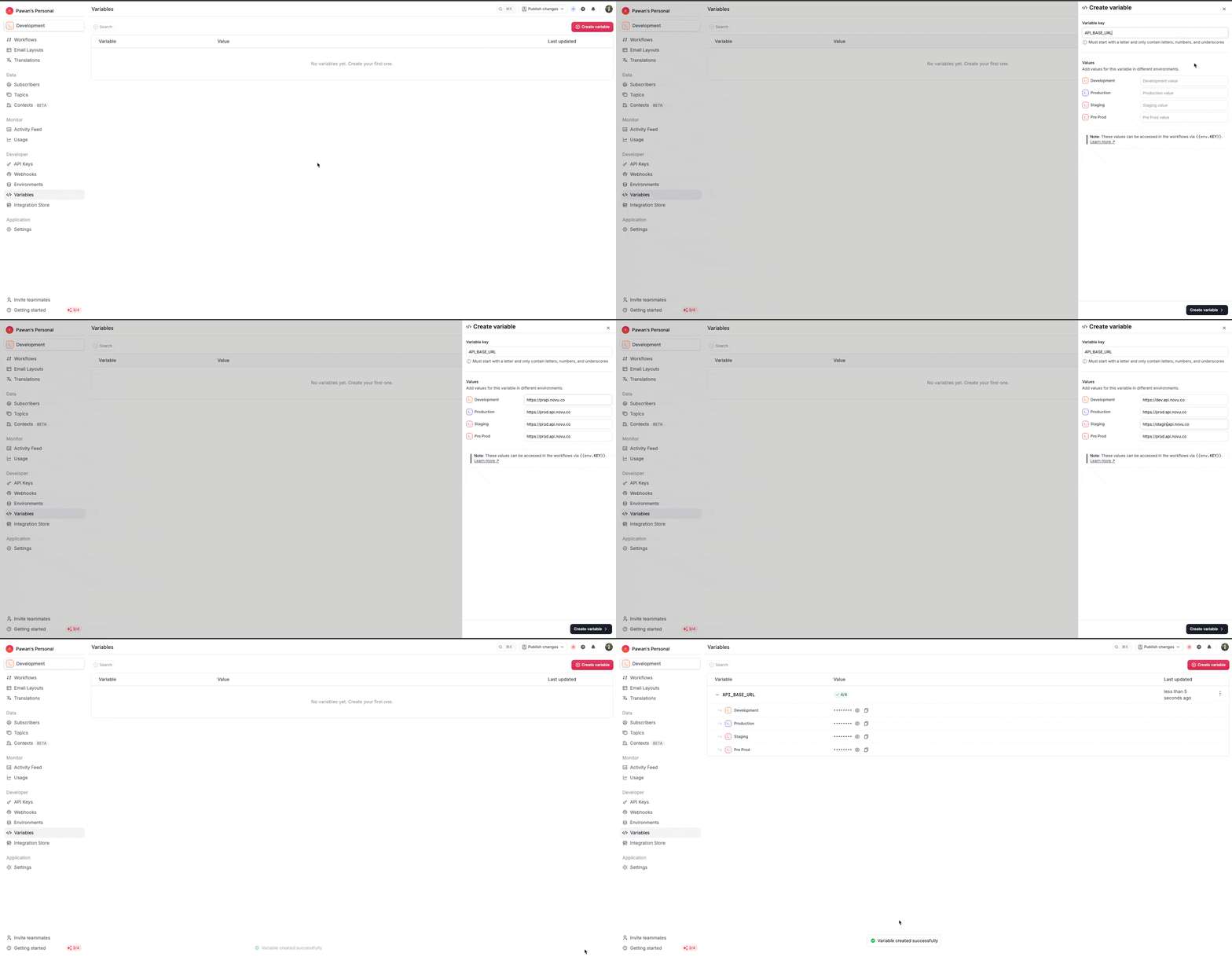
You can update values per environment, rotate secrets by replacing the stored value, or remove a variable when it is no longer needed. After you change a value, the next workflow executions use the new value without editing individual steps.
Values per environment
Each environment stores its own value for a given key. For example, the same variable might point to a staging API base URL in Development and a production URL in Production. You configure both from the environment variables screen, often in one table so you can compare environments side by side.
If a variable has no value in an environment where a workflow references it, Novu can surface a warning on the Environment variables page (for example when a value is missing in one environment but set in others) and in workflow step preview or execution context, so you can add or correct the value before relying on it in production.
Reference variables in workflows
Use Liquid with the env namespace. Keys are case-sensitive: use the same spelling and capitalization as in the dashboard when the variable was created, character for character. For example:
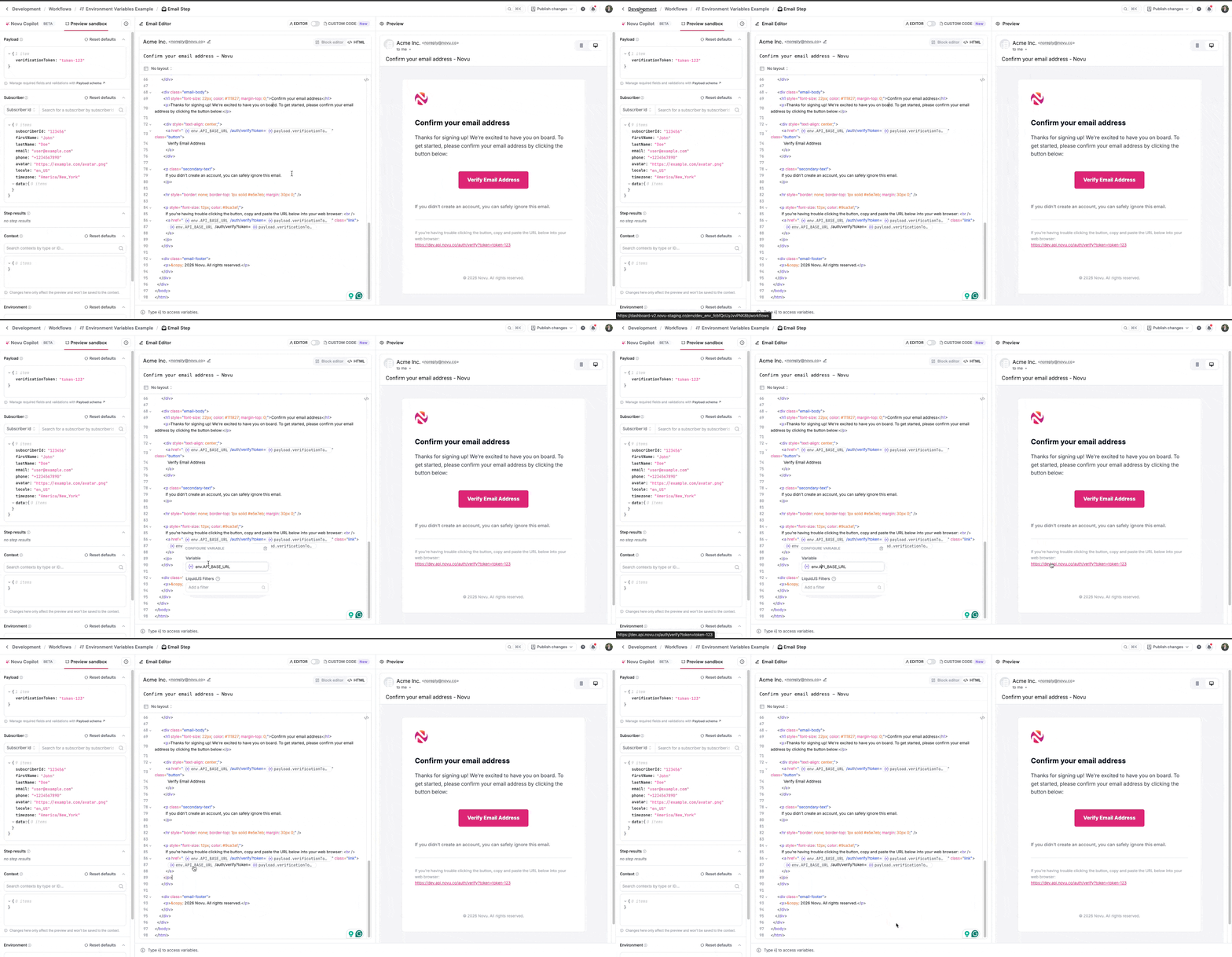
You can use these references anywhere Novu accepts Liquid syntax, including:
- Channel step editors
- HTTP request steps (URL, headers, body)
- Layouts
- Step conditions and other Liquid-enabled fields
The preview context in the dashboard can list the environment variables available for the current environment, which makes it easier to pick the correct key while editing.
Use cases
Shared API base URL
Store the base URL for an internal or partner API in one variable. Point Development at a sandbox host and Production at the live host. Every HTTP step or template uses {{ env.PARTNER_API_URL }} so a host change is one dashboard edit, not a sweep through every workflow.
Feature flags and toggles
Keep a simple string or flag value in a variable and branch conditions or template copy on it. Product or ops can flip behavior per environment without opening the workflow graph.
Credentials for HTTP steps
Put bearer tokens or API keys in secret variables and reference them in HTTP step headers. The value never appears in plain text in the UI after save, but workflows can still send authenticated requests.
Consistent branding or legal text
Store support email, terms link, or footer line in variables so marketing updates the text in one place and all templates stay aligned.
Multi-workflow consistency
When several workflows call the same external system or use the same webhook path, one variable avoids drift between copies of the same string.
Related documentation
- Environments for how Development, Production, and custom environments differ.
- Personalize content for more on Liquid and template variables beyond
env.